n8n Source Control
& Environments
How n8n uses Git to give your team separate development and production environments, version-controlled workflows, and side-by-side deployment diffs - without leaving n8n.
One n8n instance means one mistake away from breaking production.
Without environments, every workflow edit is live. There's no safe place to test changes, no way to review what changed before it ships, and no rollback if something breaks. n8n solves this with Git-backed environments - the same model engineers use for code, applied to automation.
No isolation
Changes to a workflow in production immediately affect live executions - no staging buffer.
No history
Without Git, there is no record of what changed, who changed it, or what it looked like before.
No confidence
Teams avoid touching workflows because a small mistake can break customer-facing automations.
n8n environments: Git as the backbone.
n8n links each instance to a Git branch. Work flows from development to production via push, merge, and pull - the same pattern engineers trust for code.
Development instance
Where your team builds and tests workflows freely.
Git repository
Source of truth. Stores workflow files, tags, credential stubs.
Production instance
Only receives reviewed, approved changes.
What gets stored in Git
Workflow JSON, tags, variable stubs, credential stubs (not values), data table schemas, projects, folders.
What stays local
Credential values, variable values, execution history, row data in data tables.
Feature availability
Available on Business and Enterprise plans. Instance owners and admins configure source control.
Git & Environments
Concepts, terminology, and how n8n maps to Git.
Three concepts. That's all you need.
n8n doesn't implement full Git - it uses three operations to move work between instances and the repository.
Push
Send selected workflows (and all tags/variable stubs) from your n8n instance to the Git repository. You choose which workflows. n8n commit and push happen together.
Pull
Fetch workflows, tags, and variable stubs from Git into n8n. Overwrites local copies. You must set credential and variable values manually after pulling to a new instance.
Branch
Each n8n instance connects to one Git branch. The branch stores a snapshot of that environment's workflows. Multiple instances can share one branch, or each can have its own.
⚠️ Pulling overwrites your work. Always push your local changes before pulling, or you risk losing edits that haven't been saved to Git yet.
What it looks like inside n8n.
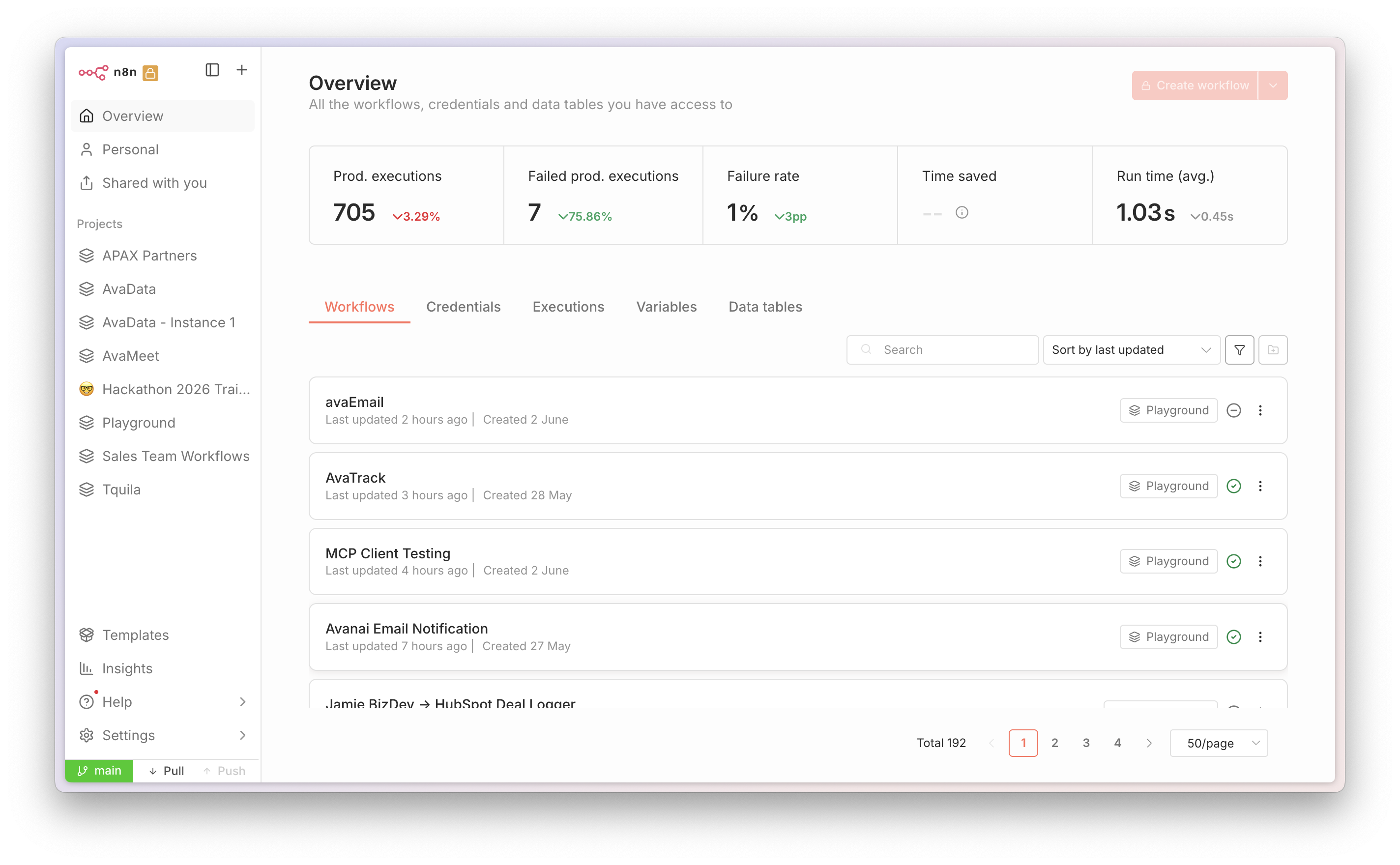
The source control panel lets you push selected workflows to Git or pull the latest from your branch. When the branch is locked, the entire n8n UI freezes - no new workflows can be created or edited, protecting production from accidental changes.
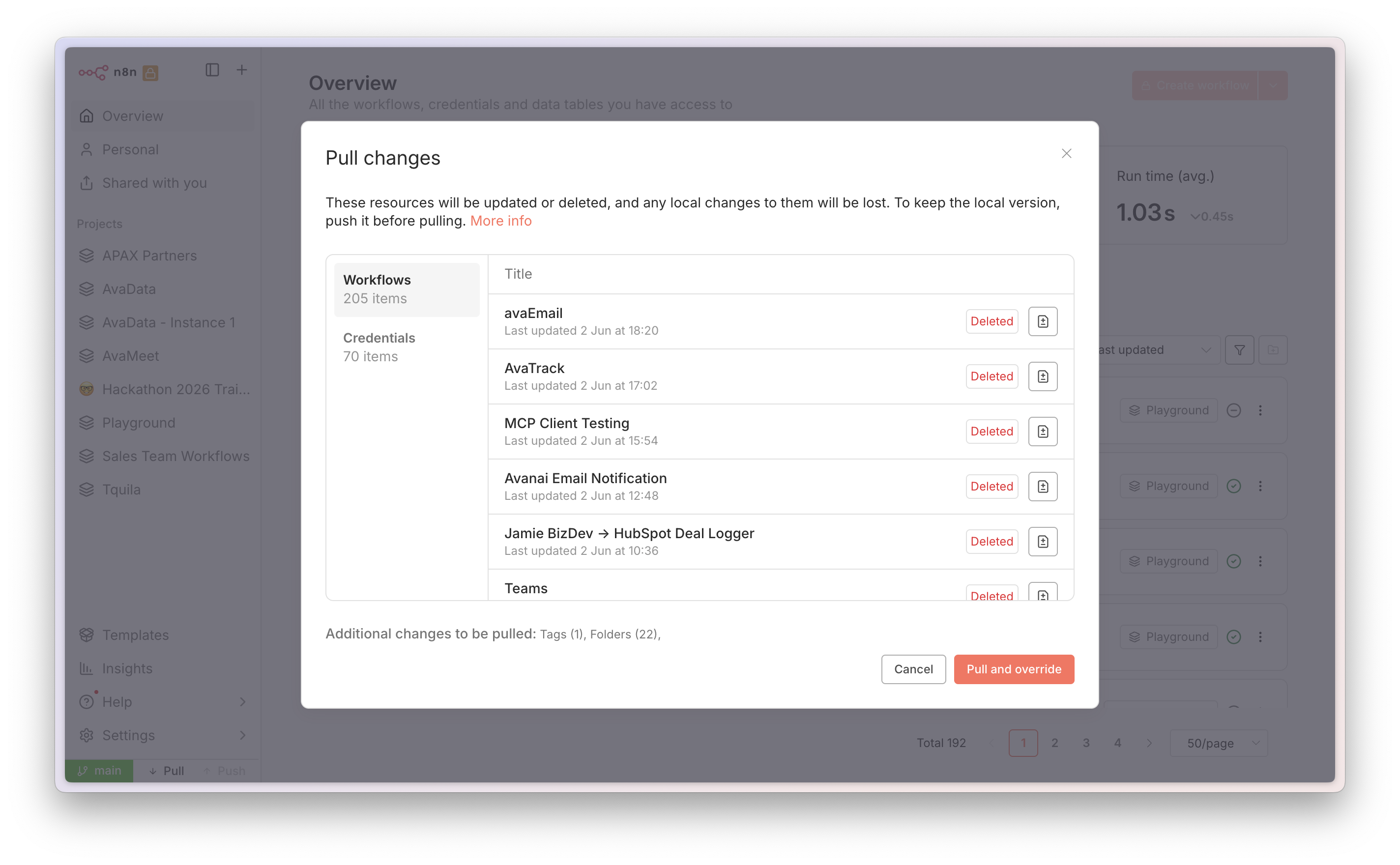
Before pushing or pulling, project managers see a selection dialog listing every workflow. Check or uncheck individual workflows to control exactly what goes into the commit - giving full control over what reaches production.
An environment = an n8n instance + a Git branch.
In software development, an environment is all the infrastructure and tooling around your code. In n8n, it's your instance configuration combined with the workflows and settings on a specific Git branch.
The n8n instance
Where workflows run. Can be cloud-hosted or self-hosted. Has its own configuration, credentials, and settings. The "runtime" half of an environment.
The Git branch
Stores the workflow definitions, tags, variable stubs, and credential stubs. The "code" half of an environment. This is the source of truth.
Credentials & variable values
Not synced to Git. You must configure them manually per instance. Use external secrets (HashiCorp Vault, AWS Secrets Manager) to manage different credentials per environment from one vault.
Common pattern
Development instance - make changes freely. Production instance - protected, only receives reviewed work via Git merge + pull. Add test/staging as your team grows.
Branch Patterns
The four ways to wire n8n instances to Git branches - and when to use each.
Choose the pattern that fits your team.
Multi-instance · Multi-branch
Each instance owns its own branch. Work moves via pull request - the safest gate to production.
Multi-instance · One branch
Dev pushes, Prod pulls - both share one branch. No PR required.
One instance · Multi-branch
One instance switches between branches to review different users' work.
One instance · One branch
Single instance pushing to one branch. Ideal for version history and backup.
Multi-instance, multi-branch: the safest path to production.
Advantages
- Changes only reach production after a pull request review in GitHub/GitLab - an extra safety gate.
- Supports more than two instances (dev, test, staging, prod on separate branches).
- Full Git history per branch - easy to roll back by reverting a commit.
- Workflow diffs show exactly what changed between branches before merging.
Trade-offs
- More steps to move work: push - pull request - merge - pull. Slower for hotfixes.
- Requires familiarity with pull requests in your Git provider.
- Automating the final pull step (GitHub Action) reduces friction significantly.
Typical workflow
Multi-branchEnterprise CI/CD - automated scans, human gates, zero-surprise deployments.
✅ Customer Onboarding
No issues found. Adds a Slack notification node on successful signup. Logic and credentials look clean.
⚠️ Invoice Processor
Semgrep: HTTP node uses a plain HTTP endpoint. Recommend switching to HTTPS before merge.
🔴 Data Sync - merge blocked
Claude: credentials appear hardcoded in Set node parameters. Remove before this PR can be merged.
Multi-instance, one branch: fast but requires discipline.
Both development and production instances connect to the same branch. When you push from dev, the work is immediately available for production to pull.
Advantages
- Simpler setup - one branch to manage.
- Work is available to pull into production immediately after pushing from dev.
- Also useful for testing n8n version upgrades: spin up a new instance on the same branch to test the new version, while production stays on the old one.
Risks
- An accidental push of unfinished work is immediately available to production.
- If you use a GitHub Action to auto-pull to production on every push, never push work you don't want in production.
- Pushing and pulling on the same instance can cause data loss - keep work flowing one direction.
💡 n8n's recommendation: Design work to flow in one direction only - either to Git or from Git, not both on the same instance. Don't push all workflows - only select what you need.
Setup & Usage
Connecting n8n to Git, pushing, pulling, and resolving merge behaviors.
Four steps to connect n8n to Git.
Step by step
Settings > Environmentsdevelopment, production).SSH (recommended)
n8n generates an ED25519 (or RSA) key pair. Add the public key as a deploy key in GitHub/GitLab with write access. More secure than HTTPS for automation.
HTTPS + PAT
Create a Personal Access Token. GitHub needs Contents read/write. GitLab needs Source code pull/push. Bitbucket: use an App Password.
Protected instance
Prevents users from editing source-controlled resources directly in this instance. Enable this on production. Users can still run workflows.
Push: save your work to Git selectively.
Instance owners, instance admins, and project admins can push. n8n pushes the saved version of a workflow, not the published version.
Push flow
Push button in main menuWhat gets committed
- ✅ Workflow JSON (you choose which)
- ✅ Credential stubs - ID, name, type only
- ✅ Variable stubs - ID and name only
- ✅ Data table schemas (you choose which)
- ✅ Projects and folders
- ❌ Credential values
- ❌ Variable values
- ❌ Data table row data
Best practice
Push immediately after finishing work on a workflow. Don't push everything at once - select only what changed. This makes it safe to pull later.
Pull: load Git's version into n8n.
Instance owners and instance admins only. Pulling fetches workflows, tags, and variable stubs from Git and loads them into n8n - overwriting local copies.
Auto publish on pull
Three modes in the pull modal: Off (keep current state), If already published (only re-publish existing), On (publish all including new). Archived workflows are never auto-published.
Ownership after pull
n8n matches workflows to users by email. If the owner isn't on the new instance, the person pulling becomes the owner. Projects are matched by name - created if missing.
Deleted resources
Resources deleted from the repository don't auto-delete locally. n8n notifies you and asks if you'd like to delete them.
⚠️ Pulling a published workflow
n8n unpublishes the workflow, applies the update, then republishes it. This causes a few seconds of downtime. Plan pulls during low-traffic windows for critical workflows.
Column removal warning
If a pulled data table has columns removed vs. your local version, n8n deletes those columns and their data permanently. n8n warns you in the pull modal before this happens.
Available via API
Use POST /api/v1/source-control/pull with "force": true to trigger pulls programmatically - ideal for automation via GitHub Actions.
n8n is opinionated about conflicts. That's a feature.
n8n auto-resolves conflicts for credentials, variables, and tags. Workflows require explicit decisions from you.
💡 Use external secrets (HashiCorp Vault, AWS Secrets Manager, Azure Key Vault, GCP Secrets Manager) to manage different credential values across environments from a single vault, without storing them in Git.
Track Changes & Workflow Diffs
See exactly what changed before you push to production.
Workflow diffs: see every change before it ships.
Compare the workflow on your instance against the version in Git - side by side, node by node - before committing to push or pull.
Where to access
Click the diff icon next to any workflow in the Commit and Push modal (when pushing) or the Modified Changes modal (when pulling).
Layout
Two workflows stacked vertically. Top panel = the version that will receive changes. Bottom panel = the version it's being compared against.
Node-level JSON diff
Click any modified node to see the exact configuration before and after - field by field. No guessing what changed.
Added
New nodes or connectors - shown in green.
Modified
Changed nodes or connectors - shown in orange. Click to inspect JSON diff.
Deleted
Removed nodes or connectors - shown in red.
Navigation
Changes counter in top-right. Next/previous arrows cycle through each change. Back button returns to the commit/pull modal.
Who can access
Instance owners, instance admins, and project admins only.
Example: catching a Pinecone namespace change before production.
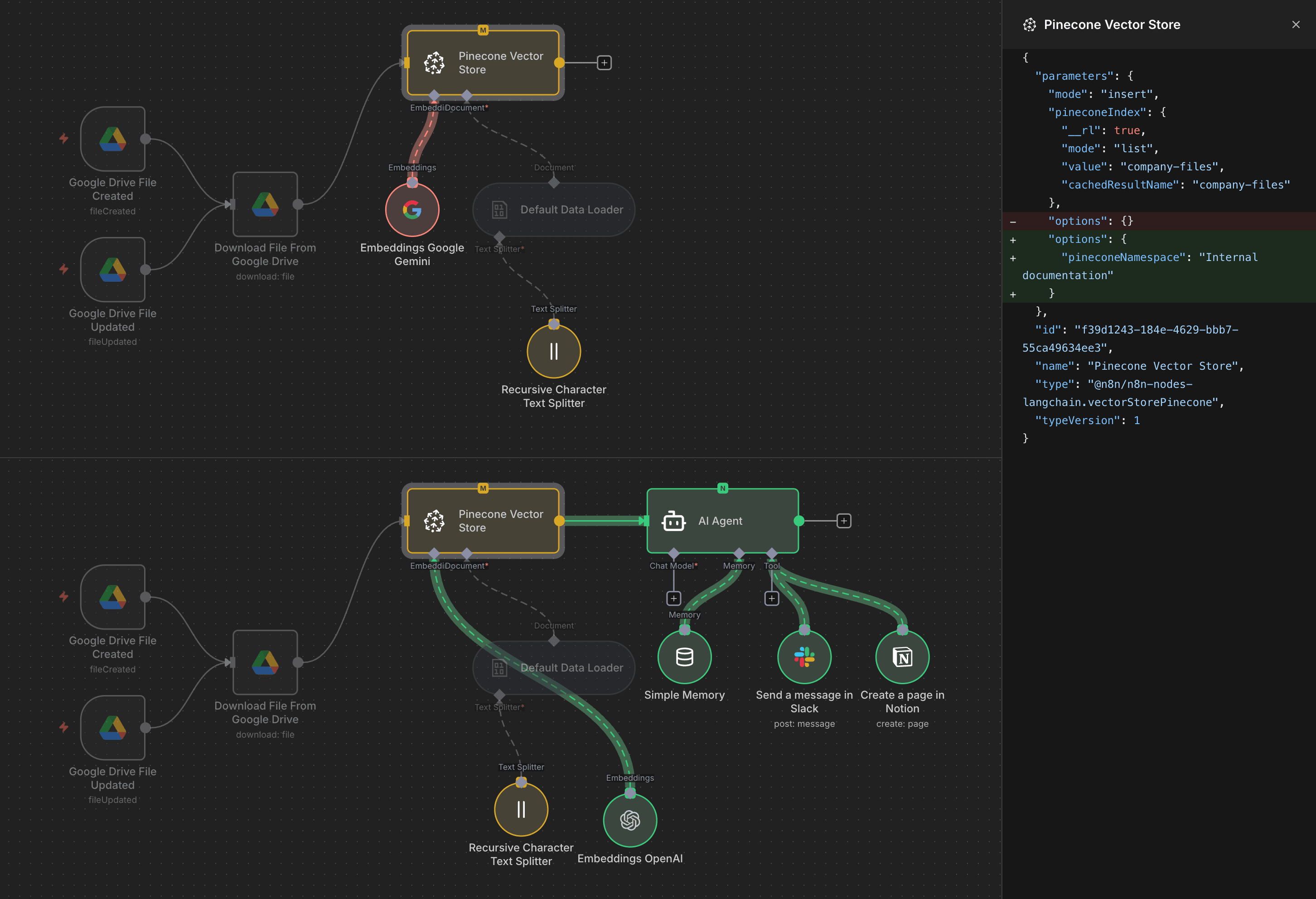
The workflow
Google Drive triggers - file download - embeddings - Pinecone Vector Store - AI Agent (with Slack and Notion tools).
The diff caught
The Pinecone Vector Store node's options field changed from {} to { "pineconeNamespace": "Internal documentation" } - a namespace being added for the vector store.
Why this matters
Without the diff, a developer might push this namespace change without realizing it would affect how documents are stored and retrieved in production - causing silent data routing issues.
Result
Team reviews the diff, confirms the change is intentional, and pushes with confidence. Zero surprises in production.
Deploy & Automate
Copying work between environments and removing the manual pull step.
Single branch vs. multi-branch: different deployment paths.
Single branch deployment
Simplest path. Both instances share the same branch.
Multi-branch deployment
Safer path with a mandatory review gate.
Git provider merge docs
GitHub: Creating a pull request · GitLab: Creating merge requests · Bitbucket: Create a pull request
Remove the manual pull step with a GitHub Action.
Use n8n's /source-control/pull API endpoint to trigger a pull programmatically after merging - so production updates itself.
API call
GitHub Action (.github/workflows/deploy.yml)
Store INSTANCE_URL and INSTANCE_API_KEY as GitHub secrets - never in the workflow file. The same pattern works with GitLab CI/CD pipelines.
Enterprise Features
Security, governance, scale, and observability for production-grade automation.
Enterprise-grade control over every part of n8n.
Self-hosted or cloud
Run n8n on your own infrastructure or managed cloud. Full control over data residency, network, and configuration.
SSO, SAML, LDAP
Provision users via your existing identity provider. 2FA enforced. Compliant with strict enterprise security standards.
External secrets vaults
HashiCorp Vault, AWS Secrets Manager, Azure Key Vault, GCP Secrets Manager. Inject credentials at runtime - not stored in n8n or Git.
Fine-grained RBAC
Custom project roles. Control view, edit, deploy, and manage permissions per user, team, or API - at the project level.
Log streaming
Stream all workflow events to your observability stack via direct integrations or webhooks to any monitoring solution.
SOC 2 audited
Cloud offering is SOC 2 audited with regular external pen tests. Security posture and certifications available in the Trust Center.
AI workflows you can trust at enterprise scale.
AI Evaluations
Test AI agent workflows with real data before deploying. Track correctness and speed at every stage. Ensure consistent results across model updates.
Queue mode & Multi-main
Run workers horizontally in parallel. Multi-main provides automatic failover so one crashed instance doesn't take down your automation.
Insights
Executions, failure rate, time saved - at a glance. Per-workflow data helps you optimize and demonstrate ROI to stakeholders.
What's on which plan.
| Feature | Plan | Notes |
|---|---|---|
| Source control & environments | Business Enterprise | Instance owners and admins configure; project admins can push |
| Workflow diffs (compare changes) | Enterprise | Requires environments feature enabled |
| External secrets vaults | Enterprise Self-hosted & Cloud | 1Password, AWS, Azure, GCP, HashiCorp |
| SSO / SAML / LDAP | Enterprise | Includes 2FA enforcement |
| Custom project roles (RBAC) | Enterprise | Fine-grained per-action permissions |
| AI Evaluations | Enterprise | Test AI agents with real data pre-deploy |
| Queue mode & Multi-main | Enterprise Self-hosted | 200+ executions/sec; automatic failover |
| Insights | Business Enterprise | Execution metrics and ROI tracking |
| Unlimited projects | Business Enterprise | Isolate workflows per team or use case |
| SOC 2 compliance | All Cloud plans | Regular external pen tests |
End-to-End Tutorial
Stand up dev and production environments in one session.
Dev + prod environments with GitHub in one session.
GitHub setup
Do this firstmain branch automatically).development and production.n8n setup (repeat for both instances)
development branch for the dev instance, production branch for prod.The deployment loop
Ongoingdevelopment to production.Both instances, one branch - fastest to set up.
GitHub setup
main branch).n8n setup (both instances)
main branch.When to use single-branch
- Small team with high trust - everyone knows not to push unfinished work.
- You want the simplest possible setup to start with and can migrate to multi-branch later.
- You're not using GitHub Actions to auto-pull to production.
When to move to multi-branch
- Your team is growing and you want a mandatory review gate before production.
- You want to automate pulls to production on merge without risk of shipping unreviewed changes.
- You need an audit trail of what merged when and who approved it.
Thank you.
Questions, feedback, or ready to set up environments? Reach out to the Avanai team.
avanai.io · n8n.io/enterprise
 ×
×